
Create with AI (build a cue sheet from your documents)
Applies to: iPhone, iPad and Mac 1.3.7
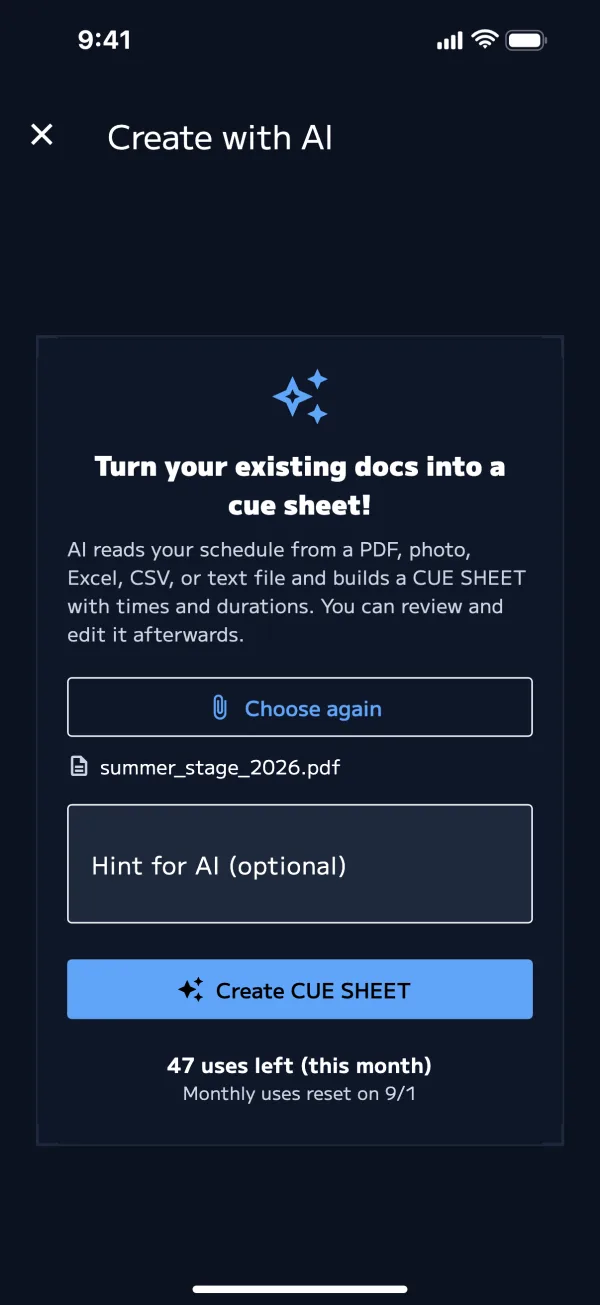
AI reads the schedule you already have (PDF, photo, Excel, CSV or text) and builds a list of cues with times and durations. You can edit the resulting cues in the editor.
Before you start
- You need to sign in (Create an account)
- Each creation uses one AI credit
- Pro (monthly or annual) includes a set number of uses each month (Pro 1 Day does not)
- If you run short, you can buy AI credits. Purchased credits don't expire
- While a sign-up campaign is running, new accounts receive Create with AI uses
- See the pricing table for the number of uses and what each plan includes
How to create
- Tap Create with AI at the bottom of the show list
- If you aren't signed in, start from "Build a CUE SHEET easily with AI". After you sign in, you go on to this screen
- Choose files (on iPhone and iPad, also Choose photos)
- Supported: PDF, PNG, JPEG, Excel (.xlsx), CSV, text
- Up to 5 files at a time, up to 20 MB each
- If needed, write a Hint for AI (optional) (e.g. main show only / changeovers are 5 minutes)
- Create CUE SHEET → in "Analyze with AI", tap Analyze
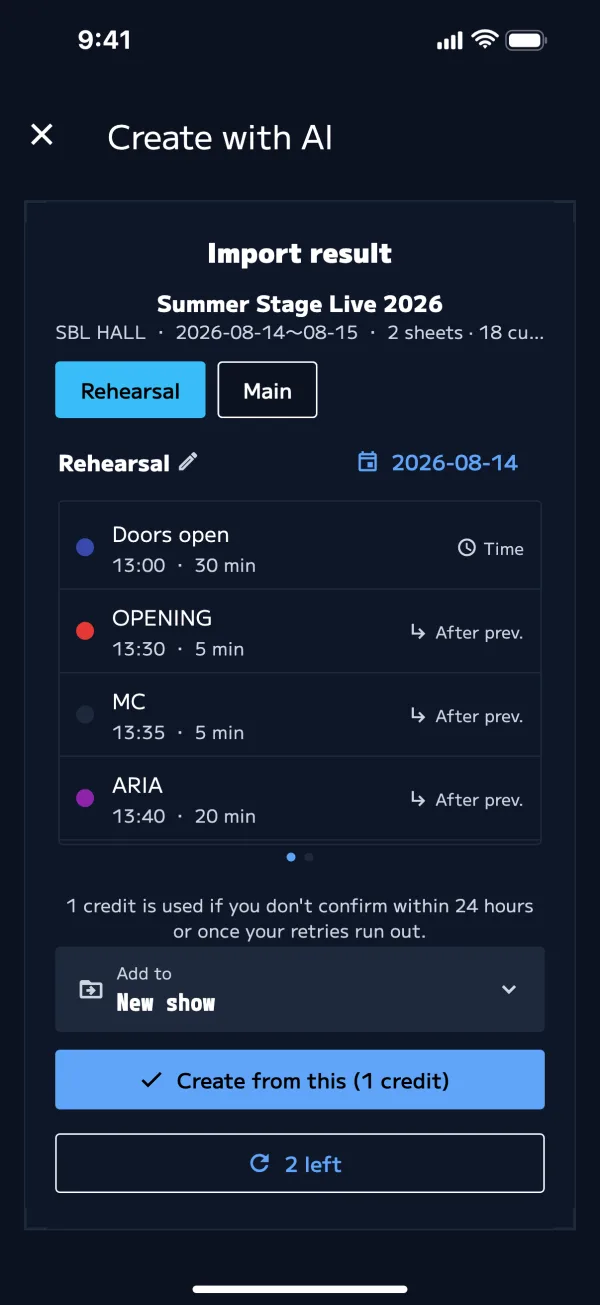
- Check the sheets and cues in "Import result". You can fix the sheet name and date here
- Choose where to Add to: "New show" or an existing show
- Create from this (1 credit) (for an existing show, Add to this show (1 credit))
Results you haven't confirmed yet stay on your device. If you close the app partway through, reopen it and choose from them again.
The sheet list of the show you created opens. Edit the cues in the editor as needed.
You can also pick SBL Cue Timer from the share menu in another app (Files, Mail, etc.). The Create with AI screen opens with that file already selected (iPhone and iPad).
Retries and credits
One credit covers the first analysis plus up to 3 retries.
| When | Credit |
|---|---|
| Analysis and retries (up to 3) | Not used yet |
| You tap Create from this | 1 credit used |
| 3rd retry | 1 credit is used automatically and a show is created from that result (you're asked to confirm first) |
| 24 hours pass without confirming | 1 credit used |
- Your remaining uses show at the bottom of the screen as "X uses left". If some uses are about to expire, it shows "X uses expire on (date)"
- Pro's monthly uses are used first, then purchased credits for the rest
- Buy credits is at the bottom of this screen, or under "AI credits" on the Account screen
Improving recognition
- Take photos with the table straight, well lit, and the text sharp
- Tables with times and act names in columns are recognized more accurately
- If you only want part of it, say so in the hint (e.g. "Part 2 only")
- Acts that follow on (starting within 60 seconds of the previous act's end) are set to "After prev.", and the first act with a time is set to "Time". If that's wrong, fix it in the editor
| Message | What to do |
|---|---|
| Couldn't read it. Try a different file. | Try a different format (PDF, photo) |
| No AI uses left | Buy credits, or wait for Pro's monthly uses to refill |
| This generation ended after 24 hours. | Start over from the beginning |
| You can import up to 5 files at a time | Choose fewer files |